The crypto derivatives market now accounts for over 70% of total crypto trading volume, with
trillions of dollars traded annually. In short, most crypto trading happens in futures and derivatives, not spot markets.
But what exactly are crypto futures? They’re contracts that let you speculate on whether a cryptocurrency’s price will rise or fall, without actually owning the asset. You can trade 24/7, profit in both rising and falling markets, and use leverage to amplify your positions.
YEX makes futures trading accessible with an intuitive platform and built-in risk management tools. This guide will walk you through everything: from setting up your account to placing your first futures trade and managing risk effectively.
What is YEX Futures?
YEX offers Perpetual Contracts with up to 125x leverage. Unlike traditional futures contracts that expire on a specific date, perpetual contracts can be held indefinitely as long as you meet the margin requirements.
-
Collateral: You use USDT or USDC as collateral.
-
Flexibility: You can hold positions for minutes, days, or months without worrying about expiration dates or physical delivery.
Key Concepts of YEX Futures
YEX perpetual futures differ from spot trading through key mechanisms that enable leveraged crypto speculation. Understanding these fundamentals is essential before opening your first trade.
Long and Short Positions
Spot trading only allows you to buy and hold. Futures trading unlocks two directions:
-
Going Long: Opening a long position means you’re betting the asset price will rise. If the market moves up, you profit.
-
Going Short: Opening a short position means you’re betting the asset price will fall. You profit when the market declines.
Unlike spot trading where you simply buy and hold an asset, perpetual contracts involve ongoing mechanisms that affect your position:
Funding Rate
Since perpetual contracts never expire, the price needs a mechanism to stay close to the real “Spot” price. This is called the Funding Rate.
- How it works: It is a small fee exchanged every 8 hours between Long traders and Short traders.
- The Rule: If the rate is positive (Green), Longs pay Shorts. If the rate is negative (Red), Shorts pay Longs.
For example: Say you have a $10,000 position in Bitcoin (using leverage). The Funding Rate is currently 0.001%
Calculation: $10,000 x 0.001% = $0.1
This $0.1 is taken from your margin every 8 hours. Over a month, that is nearly $9 in fees for holding the trade.
On the YEX dashboard, the funding rate is shown in red, and the countdown timer is in green. Always check this before holding a huge position overnight.
Leverage
Leverage is like borrowing “trading power” from YEX. It allows you to open a much larger position than your actual account balance would allow.
Example: Trading BTC with $100
You are now trading with $1,000 worth of Bitcoin, even though you only put up $100. Here is how that impacts your profit and loss:
|
Price movement
|
Result on Your Position
|
Result
|
|
Bitcoin Rises 5%
|
Your $1,000 position gains $50
|
+50% Profit on your $100
|
|
Bitcoin Falls 5%
|
Your $1,000 position loses $50
|
-50% Loss on your $100
|
Warning: Typically, YEX allows you to trade with up to 125x leverage. While this can turn tiny price movements into massive profits, it significantly increases your risk.
At 125x leverage, if the price moves just 1% against you, your entire position could be liquidated (wiped out) instantly. As a beginner, it is advised you test the waters with lower leverage (5x–10x) while learning.
This section covers the technical calculations you need to know to protect your capital.
Margin Requirements
While perpetual futures don’t have expiration dates, traders must maintain a minimum margin balance to keep their positions open. Margin is the collateral required to support your leveraged trade.
If the market moves against your position and your margin balance falls below the maintenance margin threshold, your position will be liquidated, automatically closed by YEX to prevent further losses. This protects both the trader and the platform from negative account balances.
The higher your leverage, the smaller the price movement needed to trigger liquidation, making margin management crucial for successful perpetual trading.
The two critical types of margin you must understand to avoid losing your funds:
1. Initial Margin (The “Entry Fee)
This is the amount of money you need in your wallet to open the position.
- Formula: Position Size / Leverage
- Example: To open a $1,000 Bitcoin position at 10x leverage, you need $100 as your Initial Margin.
2. Maintenance Margin:
This is the minimum amount of equity you must keep in the trade to keep it open. If the market moves against you and your margin balance falls below this specific level, your position is liquidated (automatically closed by YEX) to cover the losses.
On YEX, this rate is generally 0.40% for standard pairs (like BTC/USDT) on base tiers. If your remaining margin drops below this 0.40% level, the liquidation engine takes over and closes your position.
Let’s look at our previous example to see exactly when you get liquidated.
- Position: $1,000 worth of Bitcoin (Long).
- Initial Margin: $100 (10x Leverage).
Maintenance Margin (0.40%): $4 ($1,000 x 0.004).
What this means for you: You start with $100. You only get liquidated if your money drops all the way down to $4.This means you can lose $96 of your initial $100 deposit before the trade is forced closed.
Calculating Your Liquidation Price (Long Position); you can calculate the exact price where you will lose the trade.
Liquidation Price = Entry Price x (1 – Initial Margin Rate + Maintenance Margin Rate)
Liq Price = 50,000 x (1 – 0.10 + 0.004)
Liq Price = 50,000 x (0.904) = $45,200
Result: If Bitcoin drops from $50,000 to $45,200, you are liquidated.
Warning for High Leverage:
At 10x leverage, you have plenty of room (roughly a 9.6% price drop). However, at 100x leverage:
A price drop of just 0.6% will liquidate you instantly. This is why 100x is considered “gambling” rather than trading.
Understanding AEP (Average Entry Price)
One of the most confusing things for beginners is seeing their “Entry Price” change after they add money to an existing trade. This is called your Average Entry Price (AEP).
1If you buy Bitcoin at $60,000, and then buy more when it drops to $50,000, your entry price isn’t $60k or $50k, it is a weighted average of both.
The Formula: AEP = Total Value of All Orders / Total Size of Position
Real-World Example: You are long on ETH.
- First Buy: You buy 1 ETH at $3,000.
- Second Buy: Price drops, so you buy 1 more ETH at $2,000 to get a better price.
Your New AEP: You now hold 2 ETH total. Total Cost = $3,000 + $2,000 = $5,000.
AEP = $5,000 / 2 ETH = $2,500.
Why does this matter? Your new “break-even” point is now $2,500. As soon as the price goes above $2,500, you are in profit, even though your first buy was at $3,000. This is a common strategy called DCA (Dollar Cost Averaging).
PnL Calculation
YEX displays two types of PnL (Profit and Loss):
- Unrealized PnL: Your current “paper profit” that fluctuates with market movements based on the Mark Price. This isn’t real money until you close your position.
- Realized PnL: Actual profit or loss credited to your wallet after closing a trade, minus any fees paid. Formula: Unrealized PnL – Trading Fees – Funding Fees
The Profit Formula
How do you know exactly how much you will make?
- For a Long Position: Profit = (Exit Price – Entry Price) x Position Size
- For a Short Position: Profit = (Entry Price – Exit Price) x Position Size
Example Calculation:
Profit = (55,000 – 50,000) x 1 = $5,000
Step-by-Step Guide to Trading YEX Futures
Step 1: Sign Up for a YEX Account
If you already have a YEX account, skip to Step 2. New users will need to register before accessing futures trading.
Visit the YEX website and click [Sign Up] in the top right corner.
You have multiple registration options:
-
Email and password
-
Google account
-
Apple ID
Choose your preferred method, enter your details, and complete the verification process to activate your account.
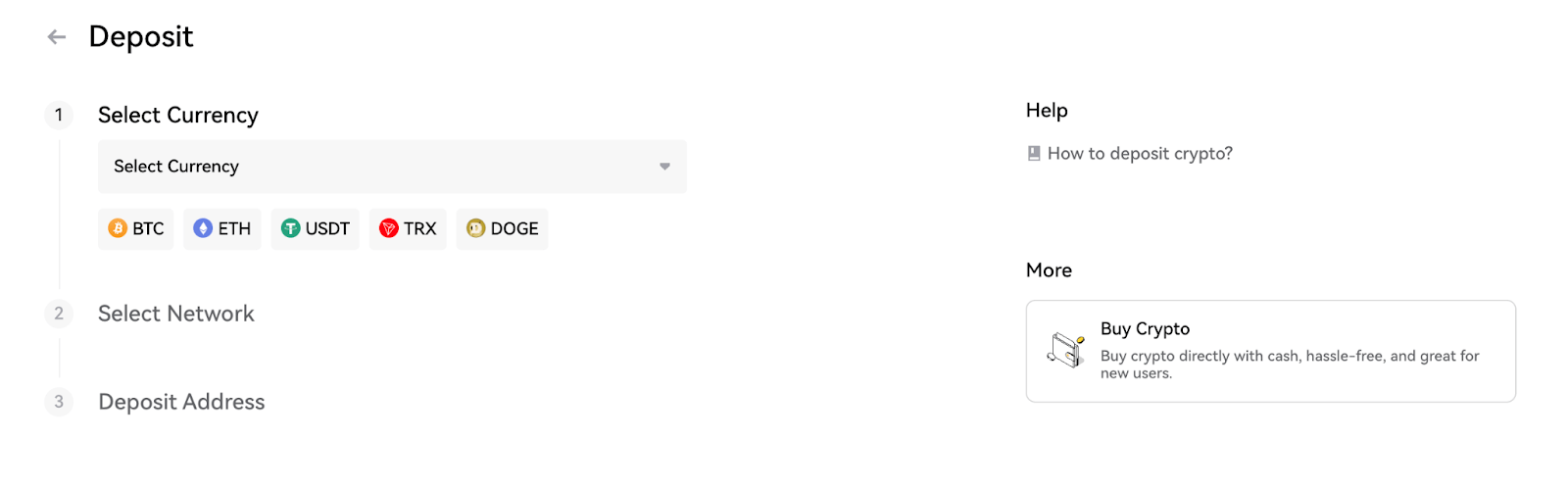
Step 2: Deposit Funds
Before depositing funds, you’ll need to complete identity verification, which typically takes less than 5 minutes. Once verified, YEX offers multiple deposit methods:
-
Fiat Deposit: Add USD or other fiat currencies using credit cards, bank transfers, Apple Pay, or other supported payment methods.
-
Crypto Deposit: Transfer crypto assets directly from your external wallet to your YEX account to begin trading and access the platform’s full range of services.
For perpetual futures trading specifically, ensure you have USDT or USDC in your futures wallet, as these are the collateral assets used for YEX perpetual contracts.
Step 3: Transfer Funds to Your Futures Wallet
Once you have funds in your spot wallet, transfer them to your futures wallet to begin trading perpetual contracts. Navigate to the wallet section and select the transfer option between spot and futures accounts.
Step 4: Analyze Your First Trade
With funds now in your YEX Futures wallet, you’re ready to execute your first trade.
Select Your Contract: At the top left of the Futures page, choose the perpetual contract you want to trade.
Analyze the Market: Use the integrated TradingView price chart to analyze price action. Access technical indicators from the toolbar on the left side to identify trading setups and entry points.
Check Key Metrics:
-
Review the current funding rate
-
Note the countdown to the next funding period
-
Switch between chart views (candlesticks, depth chart, etc.) as needed
Once you’ve completed your analysis, you’re ready to open your position.
Step 6: Review the Order Book
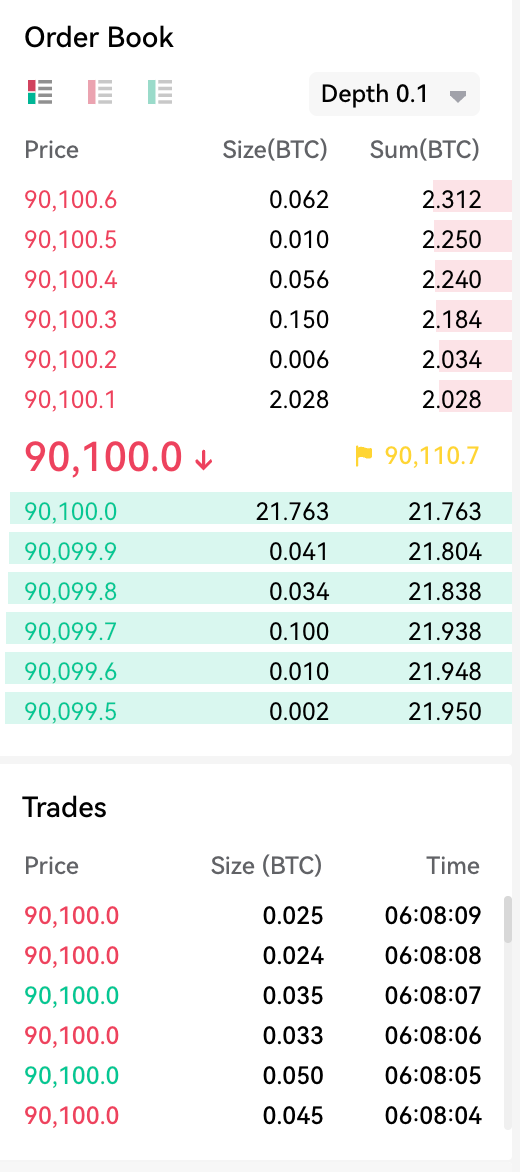
Examine the order book to identify significant buy and sell walls, large clusters of pending orders that act as support and resistance levels.
Adjust the depth precision (from 0.1 to 1) to see concentrated order zones more clearly. These areas indicate where price is likely to find support or face resistance, helping you set smarter entry and exit points.
Step 7: Enter Your First Trade
After analyzing the market, you’re ready to place your order. Configure your trade parameters:
Choose Margin Mode:
-
Cross Margin: Your entire futures wallet balance backs all open positions. Offers more flexibility but risks your full balance.
-
Isolated Margin: Only the allocated amount for this specific trade is at risk. Limits potential losses to that position.
Select Your Order Type:
-
Market Order: Executes immediately at the current market price
-
Limit Order: Executes only at your specified price or better
-
Stop Order: Triggers automatically when price reaches your specified level
Set Stop Loss and Take Profit: Toggle the [TP/SL] feature to define your exit strategy. Set your take profit target and stop loss level to manage risk automatically.
Adjust Leverage: YEX defaults to 5x leverage but allows up to 125x. Select your desired leverage and click [Confirm].
Important: Higher leverage amplifies both gains and losses. Always implement proper risk management strategies.
Execute: Choose [Buy/Long] if you expect the price to rise, or [Sell/Short] if you expect it to fall, then confirm your order.
Hedge Mode vs. Netting Mode
YEX Futures defaults to Hedge Mode, but you can switch based on your preference.
Hedge Mode
In Hedge Mode, Long and Short positions exist independently. You can hold both directions simultaneously.
Open Tab – Starting New Positions
- Open Long: Buy contracts, betting price will rise
- Open Short: Sell contracts, betting price will fall
- Key Point: If you have an existing Long and click “Open Short,” you won’t close the Long, you’ll open a separate Short position, holding both simultaneously.
Close Tab – Exiting Positions
- Close Long: Exit your Long position (sell to realize profit/loss)
- Close Short: Exit your Short position (buy back to realize profit/loss)
- Key Rule: Always use “Close” to exit positions, never open an opposite position to close.
Wrong: Have a Long → Click “Open Short” (Result: Two open trades, double fees)
Right: Have a Long → Click “Close Long” (Result: Position closed, funds returned)
Netting Mode (One-Way)
In Netting Mode, you can only hold one directional position per contract at a time. Instead of creating separate “buckets” for Longs and Shorts, all orders affect a single net position.
The Key Difference: You don’t need to use the “Close” tab. Placing an order in the opposite direction automatically reduces or closes your existing position. For example, if you have a Long position and place a Sell order, it directly reduces or exits your Long rather than opening a separate Short.
Switching Between Modes
YEX requires you to close all open positions before changing modes. Here’s how:
-
Close All Positions: Exit any active trades in your futures account
-
Go to Settings: Click the “Preferences” or “Settings” icon on the Futures dashboard
-
Select Position Mode: Switch from Hedge Mode to One-Way Mode (Netting Mode)
-
Confirm: Save your changes and begin trading with simplified position management
How to Use the Calculator
The Position Calculator helps you determine profit/loss, target prices, and liquidation levels before entering a trade.
Example Trade Setup:
-
Capital: $1,000 USDT
-
Position: Long Bitcoin at $50,000
-
Leverage: 10x
-
Position Size: 0.2 BTC ($1,000 × 10 = $10,000 ÷ $50,000)
-
Calculate Profit/Loss (PnL)
Enter your entry price ($50,000), target price ($55,000), and size (0.2 BTC). The calculator shows a $1,000 profit (100% ROI) if Bitcoin reaches your target.
-
Calculate Target Price
Enter your entry price ($50,000), size (0.2 BTC), and desired ROI (100%). The calculator reveals you need Bitcoin to reach $55,000 to double your money, giving you an exact take-profit target.
-
Calculate Liquidation Price
Enter your entry price ($50,000), leverage (10x), and size (0.2 BTC). The calculator shows liquidation occurs at $45,450, the point where your $1,000 collateral can no longer support the position.
Use the calculator to plan entries, exits, and risk management before committing your real money.
Start Trading YEX Perpetual Futures
YEX provides accessible perpetual futures trading for both hedging your portfolio and speculating on price movements with leverage. While futures offer powerful trading opportunities, they also carry substantial risk.
Success in futures trading requires disciplined risk management: always use stop losses, start with conservative leverage, and only trade with capital you can afford to lose. Take time to practice with smaller positions before scaling up.
Ready to begin? Sign up for YEX, complete verification, and start with a clear trading plan.
FAQ:
- What happens if my position gets liquidated?
If your position hits the liquidation price, the exchange automatically closes your trade and you permanently lose the margin collateral you assigned to that position.
- What are the fees for holding a position overnight?
You do not pay a traditional “overnight” fee; instead, you pay or receive a Funding Fee every 8 hours (at 00:00, 08:00, and 16:00 UTC) depending on the market balance.
- Can I trade futures on the YEX mobile app?
Yes, YEX provides a fully functional mobile app that allows you to manage futures trades from your phone.