In financial markets, “buying low and selling high” is the fundamental objective. However, executing this manually is difficult due to the need for constant monitoring. This is particularly true in cryptocurrency markets, where assets operate 24/7 and frequently experience periods of high volatility.
Grid trading is an automated strategy designed to capitalize on this volatility. Instead of predicting a specific price direction, grid trading places a “mesh” of buy and sell orders within a defined price range.
This guide explains how these systems work, specifically analyzing the AI-driven parameters available within the YEX platform.
How Grid Trading Works
Most crypto assets often spend a considerable portion of their lifecycle moving “sideways”, fluctuating within a price range rather than trending sharply up or down. Traditional strategies often struggle during these consolidation phases.
Grid trading automates the process of extracting value from this oscillation:
-
The Setup: The system populates the order book with evenly spaced limit orders above and below the current market price.
-
The Execution: When the price drops to a specific level, a buy order is filled. When the price rises to the next interval, a matching sell order is executed.
-
The Result: The difference between the buy and sell interval represents a small realized profit.
This process repeats automatically as long as the asset price remains within the pre-set boundaries.
How YEX AI Grid Bot Works
YEX AI Grid Bot allows you to trade cryptocurrencies like a professional through intelligent automation.
AI Strategy
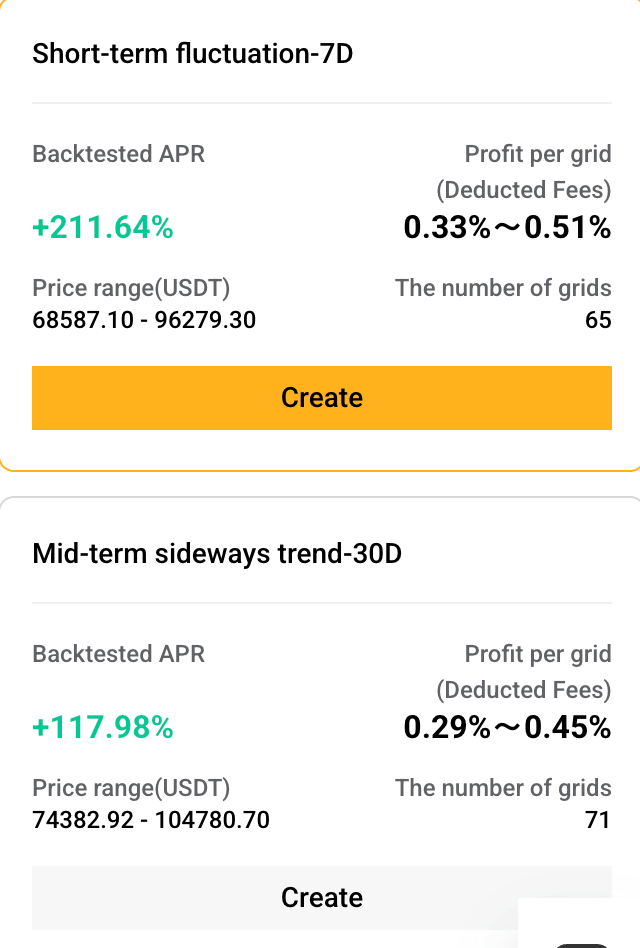
AI Strategy offers a one-click way to deploy a grid bot. The algorithm analyzes recent price history, typically over 7, 30, or 180 days, to automatically set the price range and grid structure based on the asset’s volatility. No manual calculations or chart analysis are required.
Each strategy includes a Backtested APR, which simulates how the configuration would have performed using historical price data over the selected period. This helps users compare strategies, though it does not guarantee future results.
This mode is built for beginners and anyone who values speed over granular customization. It works best in range-bound markets, where prices are consolidating between clear support and resistance levels. If you’re looking to deploy a grid quickly and let the automation do the heavy lifting, One-Click is where you start.
Manual Mode
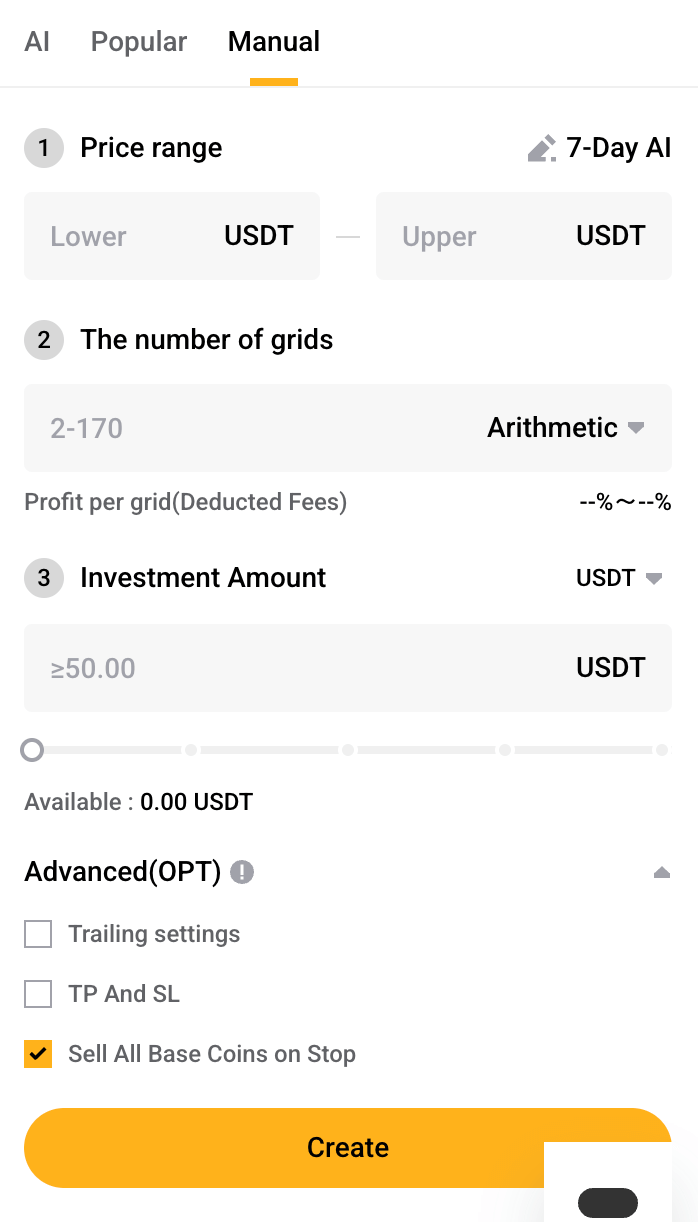
Manual Mode hands the reins entirely to you. Here, you define every element of the grid yourself: the upper and lower price boundaries, the number of grid lines or spacing intervals, and how much capital to allocate. If you’re trading futures, you also set the leverage.
This isn’t positioned as the “better” option, it’s simply the more granular one. Manual Mode is designed for experienced traders who already have a market thesis, want to test a specific configuration, or simply prefer to understand exactly why each order is placed where it is. It’s control, not complexity for its own sake.
Spot Grid vs. Futures Grid on YEX
When deploying a grid bot, traders must choose between two distinct underlying asset classes.
Spot Grid Trading
A Spot Grid trades the actual asset. When the bot buys, it buys real BTC or ETH, and when it sells, it sells what it owns. There’s no leverage involved, which means the risk profile is straightforward: your maximum loss is limited to the value of the asset you hold. There’s no liquidation event to worry about.
This makes Spot Grids the natural starting point for beginners and traders who want longer-term, lower-stress automation. The trade-off is that returns are generally more modest than futures, because there’s no leverage amplifying the profits.
Futures Grid Trading
Futures Grids operate on perpetual contracts, derivatives that track the price of an asset but don’t require you to own it. The defining difference is leverage. With futures, a 10x leverage means a 1% price move translates to a 10% change in your position’s value, in either direction.
This amplification is powerful, but it introduces two risks that don’t exist in spot trading. First, there’s liquidation: if the market moves against your position by a threshold determined by your margin, the exchange closes the position automatically and you lose your allocated capital. Second, funding fees accumulate every eight hours, a cost that quietly eats into grid profits over time, especially on longer-running bots.
Futures Grid trading is best suited for experienced traders who understand margin management and are comfortable with the added complexity.
Directional Strategies (Futures Only)
While Spot grids are generally neutral, Futures grids allow for directional bias based on market sentiment:
-
Neutral Grid: Places orders above and below the current price. Ideal for sideways markets with no clear trend.
-
Long Grid: Optimized for a bullish market with volatility. It assumes the price will generally rise over time but captures profits from dips along the way.
-
Short Grid: Optimized for a bearish market. It assumes the price will fall but captures profits from temporary rallies.
Step-by-Step: How to Set Up the YEX AI Grid Bot
How to Use AI Strategy (One-Click)
-
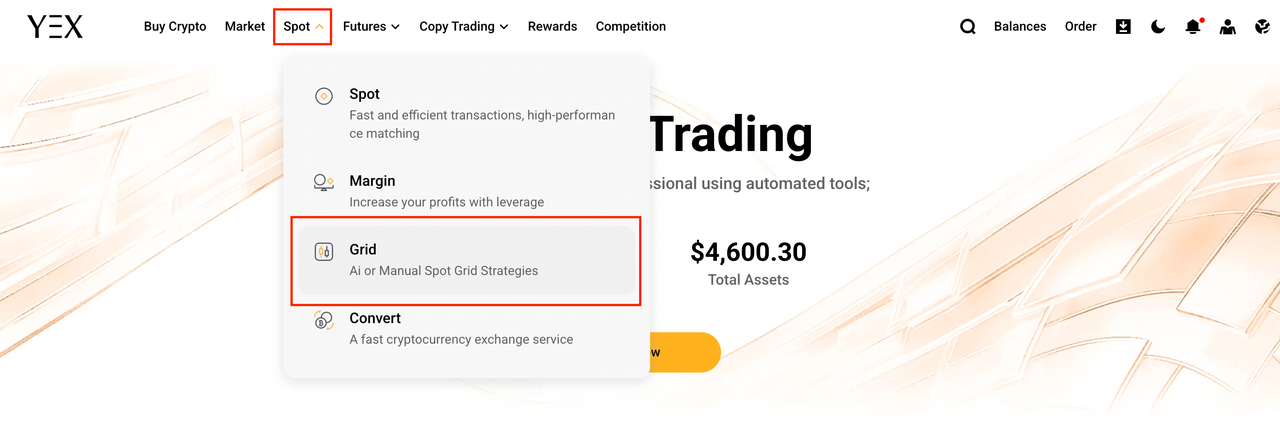
Navigate to Trading Bots From the main navigation bar, hover over Spot and select Grid to access the trading bot interface.
-
Enter the Interface: Click Trade Now to open the bot trading terminal.

-
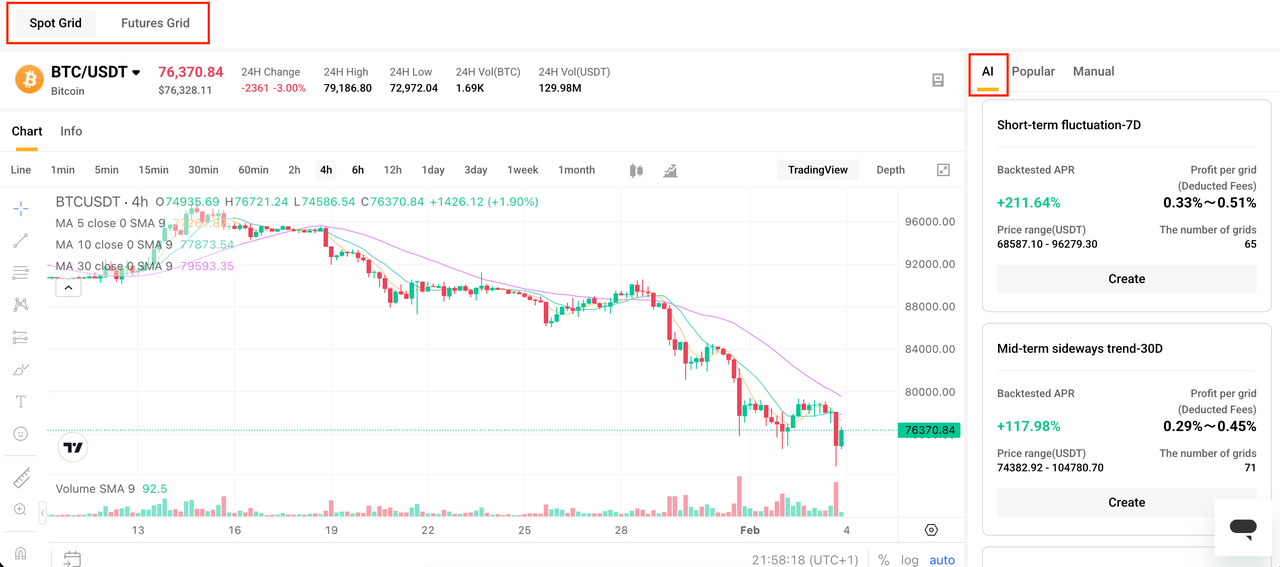
Select Market Type: Choose between Spot Grid or Futures Grid.
-
Activate AI Mode: Select AI Strategy (One-Click) as your setup mode.
-
Choose a Pair: Pick your trading pair (e.g., BTC/USDT).
-
Review Parameters: Check the AI-suggested settings, including price range, grid count, and spacing.
-
Allocate Funds: Enter the capital amount you wish to invest.
-
Launch: Confirm your settings and click Create.
-
Monitor: Check performance periodically. Note: If market conditions shift significantly (e.g., a breakout beyond the range), consider stopping the bot to reassess.
Using Manual Mode
-
Select Manual Mode from the setup screen.
-
Define your price range by setting the upper and lower boundaries based on your market analysis.
-
Set your grid count and spacing (arithmetic or geometric, depending on the asset and range width).
-
Allocate the capital you want the bot to trade with.
-
If you’re running a Futures Grid, choose your leverage level, and choose conservatively.
-
Review all settings one final time before launching.
-
Start the bot and monitor it at regular intervals.
Interpreting Performance Metrics
Once a bot is active, understanding the dashboard metrics is critical for management.
-
Grid Profit (Realized): The total profit generated from completed buy/sell cycles. This is “locked in” cash.
-
Unmatched PnL (Floating): The current profit or loss on open positions that have not yet been closed. In a dip, this number will often be negative as the bot holds inventory waiting for the price to rebound.
-
Total PnL: The sum of Grid Profit + Unmatched PnL.
-
Liquidation Price: (Futures Only) The specific price at which the exchange will forcibly close the position to prevent further loss.
Risk Management and Limitations
Automated trading is not “risk-free.” Understanding the limitations of grid bots is essential for capital preservation.
1. The “Range Breakout” Risk: Grid bots operate best in sideways markets. If the market enters a strong trend (a massive pump or crash), the price will leave the grid range.
-
If price goes Above Range: The bot sells all assets early, missing out on further upside profits.
-
If price goes Below Range: The bot accumulates assets as the price falls, resulting in a growing floating loss.
2. The Fallacy of “Set and Forget”: Market regimes change quickly. A strategy optimized for last month’s volatility may fail in this month’s trend. Traders must monitor their bots regularly (weekly or daily) to ensure the price remains within the active range.
3. Leverage Dangers: Using cross-margin or high leverage on Futures Grids creates a risk of total account depletion. Using Isolated Margin is best practice, as it limits potential losses strictly to the funds allocated to that specific bot.
4. Data Lag: AI parameters are backward-looking. They optimize for what has happened. If volatility compresses for a month and then suddenly explodes due to a regulatory announcement, the tight grid settings suggested by the AI may lead to rapid liquidation or inefficiency.
Conclusion
The YEX AI Grid Bot bridges the gap between accessibility and control. Beginners can rely on the One-Click AI Strategy, while experts can fine-tune with Manual Mode.
However, Spot and Futures are tools with vastly different risk profiles. Remember: the bot automates execution, not strategy, your judgment on when to enter and exit remains the key to success.